Builders Write: A Colorful Font for Creative Projects
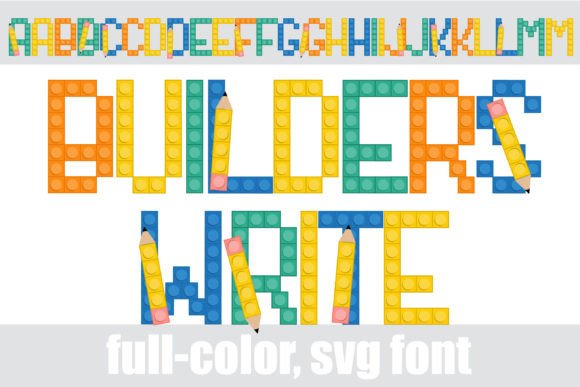
Sometimes a project calls for typography that feels less like letters on a page and more like a tangible object. If you have ever sketched a design on a napkin or played with architectural models, you know the specific charm of raw, constructive creativity. That is exactly the energy you get with the Builders Write font. It is not just a typeface; it is a full-color display font that mimics the aesthetic of building blocks and construction elements, complete with pencils integrated into the design. For designers, small business owners, and content creators looking to inject some playful, constructive personality into their work, this font offers a unique visual solution.
Understanding the Full-Color (SVG) Advantage
Before diving into specific projects, it is important to understand what makes Builders Write different from standard text fonts. This is an OpenType full-color font, specifically an SVG (Scalable Vector Graphics) font. Unlike traditional vector fonts that rely on single-color fills, SVG fonts support multiple colors, gradients, and even bitmap textures within the glyph itself. When you type a letter using Builders Write, you are essentially inserting a tiny, high-fidelity illustration.
This technology allows the font to display the "building block" style with realistic shading and the distinct colors of pencils embedded in the design without you needing to layer multiple text boxes or apply complex effects. However, because this technology is advanced, it behaves differently than a standard serif or sans serif font. It installs just like any normal .OTF file—via FontBook on a Mac or your Control Panel/Font Manager on Windows—but it requires a compatible environment to shine.
It is a common point of confusion: if you open this font in a program that does not support color fonts, or even in the preview window of some compatible programs, the text will appear black. You will only see the vibrant, multicolor design once you actually type the text onto your canvas in software like Adobe Illustrator, Photoshop, Silhouette Studio, Quark, or Inkscape. For anyone working in modern design or crafting, this distinction is vital to ensure your workflow remains smooth.
Visual Appeal and Brand Personality
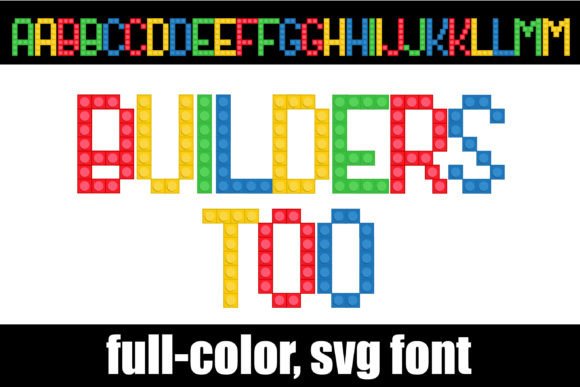
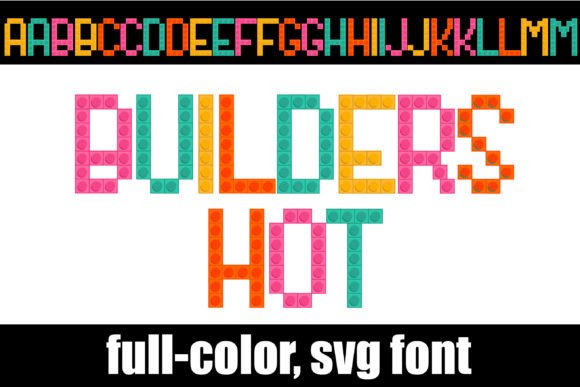
The visual weight of Builders Write is heavy, playful, and undeniably tactile. It evokes a sense of nostalgia for childhood construction toys while maintaining a modern, graphic quality. The inclusion of pencils within the character designs adds a layer of storytelling—it suggests writing, drafting, planning, and creating. This makes it an exceptional choice for brands that want to project an image of creativity, education, or hands-on craftsmanship.
When selecting a display font for branding, you are looking for something that captures attention instantly. This typeface does exactly that. It is not a font for body text; it is a statement piece. Think of it as the visual equivalent of a mascot. It has a strong personality that can define the tone of your entire project. If your brand identity relies on being approachable, fun, and creative, this font aligns perfectly with those values.
Practical Applications for Designers and Entrepreneurs
The versatility of a full-color font like this lies in its ability to act as both text and illustration. Because it is vector-based, it scales beautifully, making it suitable for a wide range of applications from digital screens to large-format printing.
Logo Design and Branding
Using Builders Write for a logo can instantly set a brand apart. It is particularly effective for businesses in the education sector, children’s entertainment, architectural firms with a casual vibe, or DIY craft stores. However, when using such a distinct font for a logo, ensure the rest of your branding materials (like business cards and letterheads) use a much simpler font pairing—perhaps a clean sans serif or a neutral serif font—to maintain balance and readability.
Merchandise and Packaging
If you are selling physical goods, packaging is your silent salesperson. This font looks incredible on merchandise like tote bags, stickers, t-shirts, and mugs. Imagine a tote bag that says "Create" or "Build" in these colorful block letters. It creates an instant emotional connection. For packaging design, using this font on the front of a box for a toy or a creative kit immediately communicates what is inside without needing a long description.
Social Media and Digital Marketing
In the fast-scrolling world of social media, stopping the thumb is the primary goal. Builders Write is an excellent asset for Instagram stories, YouTube thumbnails, and Pinterest pins. Because it is so visually dense and colorful, it creates a focal point that draws the eye. Use it for short, punchy headlines like "SALE," "NEW," or "DIY." It adds a layer of professionalism and thoughtfulness to your digital presence, showing that you invest in high-quality design assets.
Invitations and Editorial Layouts
For event planners and publishers, this font brings a festive energy. It is perfect for children’s birthday invitations, back-to-school flyers, or magazine covers targeting a creative audience. In editorial design, you can use it for drop caps or pull quotes to break up long blocks of text and add visual interest to the page.
Best Practices for Using Builders Write
To get the most out of this premium font, you need to approach it with a strategy. Here are some practical tips to ensure your designs look professional rather than cluttered.
- Prioritize Hierarchy: Because this is a display font, use it exclusively for titles, headers, and short calls to action. Never attempt to write a paragraph with it; the visual noise would make it unreadable. Pair it with a simple, legible body font like Open Sans, Roboto, or a classic serif like Georgia to let the headers pop.
- Check Your Backgrounds: Since the font contains specific colors, be mindful of your background. A busy, patterned background might clash with the "pencils" and "blocks" in the font. Solid colors—especially white, light grey, or pastels—usually allow the font to stand out best.
- Review the Character Map: The prompt notes that there is an alternate case with additional colors accessible via your system's character map. This is a hidden gem. Don't just stick to the default letters. Dig into the character map (or the Glyphs panel in Adobe software) to find variations that might better match your specific color palette. This allows for greater customization and a more tailored look.
- Licensing and Compatibility: If you are working in Silhouette Studio, you are in luck, as this font is fully compatible. However, always double-check the commercial licensing terms if you plan to use it on products for resale. Most premium fonts require a specific license for high-volume merchandise, so ensure your usage is covered to avoid legal headaches down the road.
Elevating Your Visual Communication
Ultimately, the goal of any design asset is to facilitate better communication. Builders Write does more than just spell out words; it communicates a feeling of construction, creativity, and energy. It helps bridge the gap between a flat digital design and a tactile experience. Whether you are a small business owner trying to build a recognizable brand identity or a hobbyist creating a scrapbook page, this font provides a tool that is both functional and artistic. By understanding its technical requirements and pairing it thoughtfully with other design elements, you can leverage this creative font to make your projects stand out in a crowded marketplace.