Tacky Marquee: Bold, Blocky, and Packed with Personality
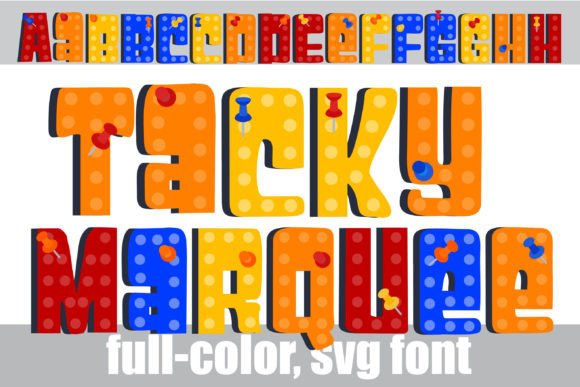
There are times in design when you need a typeface that doesn't just sit quietly on the page but practically shouts for attention. If you’ve been scrolling through endless neutral sans serifs looking for something with more grit and flair, you might have just found your match. Tacky Marquee is a full-color font that brings the nostalgic glow of vintage signage directly to your digital canvas. It isn't just a set of letters; it is a visual experience built on a sturdy, blocky sans serif foundation, adorned with intricate marquee lighting and textural tacks.
For designers, small business owners, and content creators, finding a font that bridges the gap between playful nostalgia and modern impact can be a challenge. You want something that feels retro but functions like a modern design asset. This particular typeface offers a unique solution. Because it utilizes OpenType full-color (SVG) technology, the "lighting" and "tacks" aren't just outlines you have to color in manually—they are pre-rendered graphics embedded into the font file itself. This means you get complex, multi-colored designs the moment you start typing.
A New Era of Modern Typography
Understanding how full-color fonts work is essential for anyone looking to integrate them into their workflow. Unlike traditional fonts that rely on simple vector outlines, SVG (Scalable Vector Graphics) fonts contain actual color data. When you install Tacky Marquee, you are installing a premium font that behaves differently than your standard serif font or script font.
The visual appeal lies in the details. The "blocky" structure ensures readability, while the "marquee" elements add a layer of high-energy decoration. It captures that classic theater-sign aesthetic—think bright bulbs and industrial tacks—without requiring hours of manual illustration. However, it is important to note the technical limitations of this technology. In programs that do not support color fonts, such as older versions of Microsoft Word or certain lightweight text editors, Tacky Marquee will default to a solid black silhouette. While the shape remains legible, the magic of the color is lost until you move to a compatible platform.
Compatibility is key here. If you are working in Adobe Illustrator, Photoshop, InDesign, or even Silhouette Studio, you will see the full color palette immediately when typing. For those using Quark or Inkscape, the experience is similarly vibrant. If you are unsure whether your software can handle it, the test is simple: type a few words. If you see the colorful, textured marquee effect, you are good to go. If it appears black, you may need to switch environments.
Practical Applications for Branding and Business
So, where does a font like this actually fit into a professional workflow? The answer lies in high-impact visual communication. Because Tacky Marquee is so distinct, it works best for titles, displays, and headers rather than long-form body text. It is a design asset meant to grab a viewer's split-second attention.
Consider the world of logo design. For a business that wants to convey energy, nostalgia, or entertainment—such as a retro arcade, a festival, a podcast, or a creative agency—this font provides an instant brand identity. It eliminates the need to create complex lighting effects in post-production because the typography itself is the illustration.
Here are several specific scenarios where this typeface shines:
- Packaging Design: If you are designing labels for a limited-edition product or a seasonal sale, the marquee style screams "special event." It works exceptionally well for food packaging that aims for a vintage diner vibe or for tech products that want a "neon" aesthetic.
- Social Media Graphics: In the fast-scrolling environment of Instagram or TikTok, a standard sans serif font can easily be ignored. Using a display font like Tacky Marquee for your headlines can stop the scroll. It is perfect for announcing sales, new YouTube videos, or podcast episodes.
- Merchandise and Apparel: T-shirt designers often struggle with adding texture to text. This font solves that problem by providing a pre-textured, tactile look featuring the "tacks" and lighting. It is ideal for streetwear brands or band merchandise.
- Invitations and Editorial Layouts: For a birthday party with a carnival theme or a magazine spread about pop culture, this font sets the mood instantly. It adds a layer of editorial design flair that standard fonts cannot replicate.
Installation and Workflow Tips
Getting started with Tacky Marquee is straightforward, provided you follow standard installation procedures for OpenType files. For Mac users, the process typically involves opening the file in FontBook and clicking "Install Font." Windows users can usually right-click the file and select "Install," or manage it through their preferred font manager.
One of the most common hurdles with full-color fonts is the preview window. Even in programs that support color fonts, the font preview menu often displays the glyphs in black and white. This is a limitation of the operating system’s font rendering engine, not the font itself. Do not be alarmed if the preview looks monochromatic; once the font is applied to your active document canvas, the colors should render correctly.
Another valuable feature of this specific typeface is the inclusion of an alt case. Many users overlook the character map, but this is where you can unlock additional color variations. By accessing the glyph panel in your design software, you can swap out standard characters for alternate versions that might feature different color combinations or lighting intensities. This allows for even greater customization, ensuring your final design matches your specific brand palette or project needs.
Strategic Typography and Font Pairing
When incorporating a bold, stylistic font like Tacky Marquee into your designs, the surrounding typography matters. Because this font is heavy on texture and visual noise, it pairs best with clean, simple companions. You generally want to avoid pairing it with a handwritten font or a complex script font, as the two will compete for attention and result in a cluttered look.
Instead, look for a clean geometric sans serif or a simple serif font for your subheadings and body copy. For example, if you use Tacky Marquee for a headline on a poster, use a font like Helvetica, Roboto, or Open Sans for the event details. This contrast allows the marquee effect to remain the hero of the design while maintaining readability for the important information.
When designing for web design or blogs, be mindful of load times and rendering. While SVG fonts are standard OTF files, they can be heavier than standard vector fonts. Therefore, it is best to use them sparingly—perhaps for the main blog post title or a specific call-to-action button—rather than for every heading on the page.
Commercial Licensing and Final Considerations
Before using Tacky Marquee in a commercial capacity, it is always wise to review the licensing terms. Most premium fonts come with a license that covers commercial use, such as for client work, physical products, or digital sales, but the specifics can vary. Ensure that your license covers the intended output, especially if you plan to sell printables or merchandise featuring the font.
Ultimately, typography is one of the most powerful tools in a designer's arsenal. It communicates tone, sets expectations, and guides the viewer's eye. By adding a tool like Tacky Marquee to your library, you gain the ability to inject instant personality into your projects. Whether you are a crafter looking to spice up a Silhouette project or a marketer designing a high-energy campaign, this font offers a practical, visually striking solution that standard typefaces simply can't match.