Sticky Glue: A Playful Font for Bold, Modern Designs
There's a certain kind of energy you want in a design that refuses to be ignored. It’s the feeling of a brand that’s fun, approachable, and bursting with personality. For designers, entrepreneurs, and content creators, finding a typeface that captures that spirit can be the key to unlocking a project's full potential. Enter Sticky Glue, a full-color font that brings a unique, tactile quality to digital text, making your headlines and logos feel almost three-dimensional.
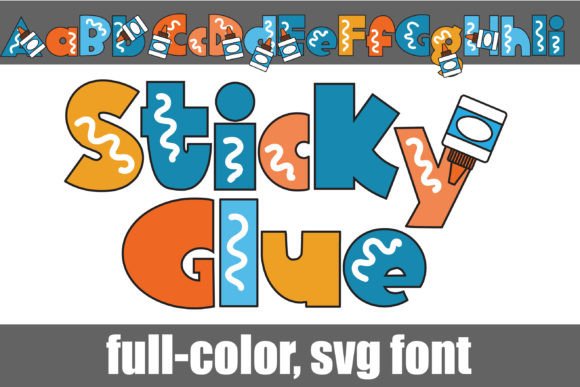
At its core, Sticky Glue is a blocky sans serif font, but with a twist that sets it apart. Imagine the clean, sturdy lines of a classic sans serif, but infused with a playful, gooey texture that mimics the look of glue. This isn't just a flat color; the font is engineered as an OpenType full-color SVG font, meaning it carries its vibrant, multi-toned appearance directly within the font file itself. The result is text that pops off the screen or page with a level of detail and charm that standard fonts simply can't match.
Where Bold Typography Meets Creative Branding
The true test of a creative font is its versatility. Sticky Glue isn't just a novelty; it's a powerful tool for establishing a distinct brand identity. Its playful yet confident character makes it ideal for businesses and projects targeting audiences that appreciate creativity and approachability. Think of a children's book publisher, a quirky stationery brand, a podcast for makers, or a social media influencer known for vibrant DIY content. The font instantly communicates a sense of fun and hands-on creativity.
For logo design, this typeface offers an immediate standout factor. A logo set in Sticky Glue doesn't just spell out a name—it tells a story about the brand's personality before a single word of the tagline is read. It’s equally effective for packaging design, where shelf appeal is everything. A product name rendered in this font can grab a customer's attention from across the aisle, suggesting the contents are as fun and engaging as the label itself.
Practical Applications Across Your Projects
Understanding where a font like this shines helps you make smarter design choices. Its best use is for display purposes where impact is the primary goal. Consider these applications:
- Marketing & Social Media: Create scroll-stopping graphics for Instagram stories, Facebook ads, or Pinterest pins. The font's inherent personality can boost engagement and make your content more shareable.
- Editorial & Print Design: Use it for magazine headlines, poster titles, or event invitations where you want to inject energy and a modern, tactile feel.
- Digital Products & Web Design: Perfect for hero section headlines on a website, chapter titles in an e-book, or graphics for online courses. It helps break the monotony of standard web fonts.
- Merchandise & Invitations: Design standout t-shirt graphics, tote bag prints, or birthday party invitations that feel custom and special.
It’s important to remember that this is a display font, not a body text font. Its detailed, textured appearance is designed for short bursts of text—titles, headers, logos, and pull quotes. Using it for long paragraphs would compromise readability. The key is to pair it with a simpler, highly legible font for your body copy. A clean sans serif or a classic serif font often makes the perfect partner, allowing Sticky Glue to be the star of the show while maintaining a professional and readable layout.
Technical Considerations for Seamless Integration
Adopting a full-color SVG font into your workflow is straightforward, but there are a few key points to ensure success. First, installation is the same as any other .otf font. Mac users can install via FontBook, while Windows users can use the Control Panel or a preferred font manager. Once installed, it will appear in your font lists.
The crucial thing to understand is program compatibility. Not all design software can render the full-color SVG data. In non-compatible programs, the font will simply appear as a solid black version. However, in supported software like Adobe Photoshop, Illustrator, InDesign, Silhouette Studio, QuarkXPress, and Inkscape, you will see the font in its full, colorful glory. A good rule of thumb: if you type and the text appears in color on your canvas, the program supports it. It may often show as black in the font preview window, even in compatible software, so always test by typing.
This font comes with an alt case, providing additional color variations accessible through your system's character map. This feature expands your creative options, allowing for even more customization in your designs. From a commercial standpoint, always review the licensing terms included with your purchase to ensure they align with your intended use, whether for personal projects or commercial client work.
Making Your Mark with Intentional Typography
Choosing a typeface like Sticky Glue is a deliberate design decision. It’s about aligning your visual communication with your brand's voice. The font’s blocky sans serif foundation ensures it remains clear and impactful, while the glue effect adds a layer of tactile, nostalgic fun. This combination helps improve visual consistency across your materials when used strategically, reinforcing brand recognition through a unique and memorable visual element.
Before finalizing any project, always test your font pairings. See how Sticky Glue interacts with your chosen body font. Check the readability of your headlines at different sizes, especially on mobile devices. The goal is to harness its playful energy without sacrificing the clarity and professional presentation your audience expects. When used thoughtfully, a premium font asset like this becomes more than just letters on a page—it becomes a cornerstone of your brand's visual identity, helping you connect with your audience in a more engaging and memorable way.