Pixelcraft Crayon: A Colorful Font for Playful, Eye-Catching Designs
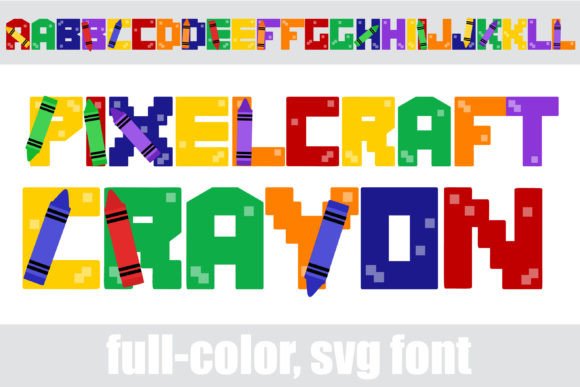
There's a certain magic in the look of a freshly drawn crayon. It’s nostalgic, vibrant, and full of personality. For designers and creators seeking to capture that playful energy in their work, the Pixelcraft Crayon typeface offers a unique solution. This isn't just another display font; it’s a full-color, pixelated SVG font where each letter appears as if drawn with a chunky, bright crayon. The result is a creative font that instantly injects fun, whimsy, and a pop of color into any project.
The visual appeal of Pixelcraft Crayon lies in its clever combination of two distinct styles. The pixelated construction gives it a retro, digital feel reminiscent of classic video games, while the crayon texture softens it with a handmade, organic quality. This duality makes it incredibly versatile. It can lean into a techy, 8-bit aesthetic for a gaming blog or embrace a more childish, playful vibe for a children’s brand. The key feature is its color. Each glyph is rendered in a bright, cheerful hue, eliminating the need for post-production coloring. For projects where you need immediate visual impact, this premium font delivers.
Practical Applications: Where This Font Shines
Understanding where to use a specialty typeface like this is crucial. Its bold, colorful nature means it’s not suited for long paragraphs of body copy. Instead, it excels as a headline, title, or accent font. Think of it as the exclamation point in your typographic toolbox.
For branding and logo design, Pixelcraft Crayon is perfect for brands targeting younger audiences, families, or the creative arts sector. Imagine a logo for a children’s educational app, a toy store, or a summer camp. The font does half the branding work for you, communicating fun and creativity at a glance. It’s also excellent for packaging design, especially for kids’ snacks, crayons, craft kits, or any product where a sense of play is a key selling point.
In the digital space, its uses are equally broad. For social media graphics, it can make announcements, quotes, or sale promotions stand out in a crowded feed. The built-in color ensures high visibility. For web design, it can be used strategically for hero text, navigation labels on playful sites, or call-to-action buttons to draw the eye. Bloggers and content creators can use it for featured image titles or chapter headings in digital magazines to add a unique editorial design touch.
Physical projects benefit greatly as well. It’s a standout choice for posters for school events, community fairs, or indie movie screenings. For merchandise like t-shirts, mugs, and stickers, the font creates instantly recognizable designs. Event planners will find it ideal for invitations to birthday parties, baby showers, or any celebration that calls for a joyful atmosphere. Even in marketing assets like flyers or email headers, a burst of crayon-colored text can increase engagement and recall.
Working with a Full-Color SVG Font
Pixelcraft Crayon is an OpenType full-color (SVG) font, which is a modern font technology. This means the color and texture information are embedded directly within the font file. The most important thing to know is that color fonts will show as black in non-compatible programs. This is normal. You will know your software supports full-color fonts when you type and see the colors appear on your document.
Installation is straightforward. Like any standard .otf font, you install it via FontBook on a Mac or through your preferred font manager or Control Panel on Windows. It’s also compatible with Silhouette Studio, making it a valuable asset for crafters using cutting machines.
Programs that currently support full-color SVG fonts include many major design applications: Adobe products (like Photoshop, Illustrator, and InDesign), Silhouette Studio, Quark, and Inkscape. In these programs, you can type directly and see the vibrant colors. In other applications, the font will default to a solid black version, which is still useful but loses the key colorful feature.
A practical tip: when you first select Pixelcraft Crayon in a compatible program, the preview window or font menu might still display it in black. Don’t be alarmed. The colors will only render once you actively type with the font on your canvas. Always test it by typing a few characters in your actual document.
Pairing and Professional Considerations
Because Pixelcraft Crayon is such a strong personality font, pairing it effectively is key to a professional presentation. The goal is visual consistency and readability. For body text that will accompany your Pixelcraft headlines, choose a simple, neutral sans serif font or a clean serif font. A modern typography choice like a geometric sans serif will complement the pixel grid without competing for attention. Avoid pairing it with other ornate script fonts or handwritten fonts, as this can create visual chaos.
Consider your project goals. If you’re designing for brand identity, use Pixelcraft Crayon consistently for all headlines across your website, social media, and print materials to build brand recognition. Its unique color and style become part of your brand’s visual language.
Readability is paramount. Use it in large sizes for short bursts of text. Avoid using it for small, critical information like contact details or legal disclaimers. Test your designs at a glance to ensure the message is clear. The extra alt-case colors included in the font file (accessible via your system’s character map) offer additional design flexibility, allowing you to manually vary colors for a custom look.
Finally, if you plan to use this font for commercial projects—like designing logos for clients, creating merchandise for sale, or developing digital products—always verify the licensing terms of your purchase. Ensuring you have the proper commercial font license protects both you and your clients.
In essence, Pixelcraft Crayon is more than a novelty. It’s a specialized design asset that solves a specific creative challenge: how to add instant, playful, and colorful typography to a project. Used thoughtfully, it can elevate designs from ordinary to memorable, helping your work connect with an audience that appreciates creativity and joy. Whether you’re a small business owner, a marketer, or a hobbyist, it provides a direct route to adding personality and visual punch where you need it most.