Battlefield Font: Your Go-To Typeface for Gritty, Bold Designs
Every creative project tells a story, and sometimes that story isn't polished or pristine—it's raw, rugged, and real. Whether you're designing a logo for an outdoor adventure brand, crafting social media graphics for a fitness studio, or creating packaging for artisanal goods, you need a typeface that communicates authenticity and power. That's where the Battlefield font steps in, offering designers and creators a tool that brings immediate visual impact and a distinctive edge to any project.
What Makes Battlefield Stand Out
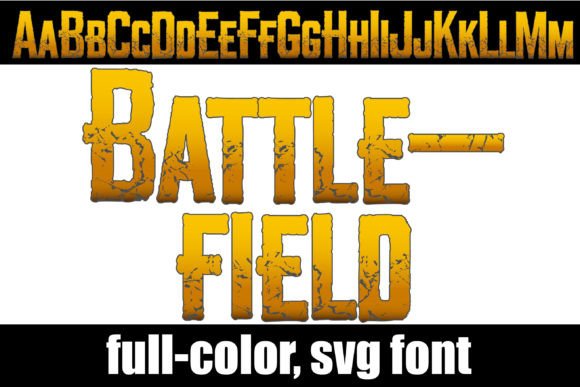
At its core, Battlefield is a full-color display font with a grungy, war-torn aesthetic rendered in an earthy color palette. Think muted browns, deep greens, and weathered tones that evoke a sense of history and ruggedness. This isn't your typical clean, sans serif typeface. It's a creative font designed to make a statement, especially when used for titles, headers, posters, and other prominent design elements where you want text to command attention.
What truly sets this premium font apart is its use of OpenType full-color (SVG) technology. Unlike standard fonts that rely on single-color outlines, Battlefield delivers rich, multi-colored letterforms directly within the font file. The earthy gradients, textured surfaces, and subtle color variations are all built in, giving your typography a handcrafted, distressed appearance without any additional design work on your part. It also includes an alternate case with additional colors accessible through your system's character map or Silhouette's glyph map, expanding your creative options even further.
Practical Applications Across Industries
The versatility of a typeface like Battlefield extends far beyond a single niche. Its distinctive personality makes it suitable for a surprising range of projects, both digital and print.
For branding and logo design, Battlefield can anchor a brand identity that needs to feel grounded, adventurous, or heritage-inspired. Imagine a craft brewery, a rugged outdoor apparel company, or a specialty coffee roaster—these brands often benefit from typography that feels tactile and lived-in rather than sleek and corporate. Using this display font in your logo or wordmark immediately signals a certain brand personality to your audience.
In packaging design, the earthy tones and textured quality of the font can complement natural materials like kraft paper, recycled cardboard, or canvas. It works beautifully for product labels, box designs, and tags where you want the typography to feel like part of the product's story rather than an afterthought.
Social media graphics and web design benefit from fonts that stop the scroll. A bold, textured headline set in Battlefield can anchor a promotional post, a blog header, or a website banner. Because it's so visually distinct, it works best in short, impactful bursts—think titles, quotes, or call-to-action phrases rather than long paragraphs of body text.
For print materials like posters, event flyers, and editorial layouts, this typeface brings an editorial edge. It's particularly effective for music festival posters, vintage-themed event promotions, or magazine covers that aim for a gritty, cinematic feel. Merchandise designers will also find value here, as the font translates well onto t-shirts, hats, tote bags, and other printed goods where bold typography drives the design.
Invitations for themed events—think rustic weddings, outdoor adventure parties, or themed corporate retreats—can use Battlefield to set the tone before guests even arrive. Paired with the right paper stock and design elements, it creates a cohesive, immersive experience.
Making It Work: Pairing and Readability
One of the most important principles in modern typography is knowing when and where to use a display font. Battlefield is a powerhouse for headlines and short-form text, but it's not designed for body copy. For longer passages, pair it with a clean sans serif font or a simple serif font that offers excellent readability at smaller sizes. Think of Battlefield as the lead vocalist and your body typeface as the rhythm section—each plays a distinct role, and together they create harmony.
When choosing a font pairing, consider contrast. A geometric sans serif can balance the organic, distressed quality of Battlefield. A classic serif can add a touch of refinement that grounds the ruggedness. Experiment with a few combinations and see which pairing best serves your project's goals. The key is visual consistency—your typography should feel intentional and cohesive, not chaotic.
Readability is always a priority. Because Battlefield features textured, multi-colored letterforms, it performs best at larger sizes where those details are clearly visible. At small sizes, the grungy texture can become muddy and difficult to read. Use it strategically where it will have the most impact, and let simpler typefaces handle the supporting roles.
Working With Full-Color SVG Fonts
If you haven't worked with full-color SVG fonts before, the process is straightforward. These fonts install just like any standard .otf file—use FontBook on Mac or your preferred font manager or Control Panel on Windows. One thing to keep in mind: color fonts will appear as black in programs that don't support the SVG format. Even in compatible programs, they may show as black in the font preview window. You'll know your software supports full-color fonts when you type on the document and see the colors rendered correctly.
Programs like Adobe Illustrator, Adobe Photoshop, Silhouette Studio, Quark, and Inkscape currently support full-color SVG fonts. For designers working in these environments, Battlefield integrates seamlessly into your existing workflow. Silhouette users in particular will appreciate the compatibility, as the font works directly within the software for cutting and crafting projects.
The alternate case with additional colors is another feature worth exploring. By accessing your system's character map or Silhouette's glyph map, you can unlock different color variations within the same font, giving you even more flexibility without switching typefaces.
Choosing the Right Font for Your Project
Not every project calls for a grungy, textured display font, and that's perfectly fine. The art of choosing typography lies in matching the font's personality to your project's message and audience. Battlefield excels when your design needs to communicate strength, authenticity, history, or a connection to the outdoors. It's less suited for corporate reports, medical brochures, or minimalist luxury branding where clean lines and understated elegance are the goal.
Before committing to any creative font for a commercial project, take time to test it in context. Drop it into your actual design mockup rather than evaluating it in isolation. See how it interacts with your color palette, imagery, and layout. Check the licensing terms to ensure they cover your intended use, whether that's a client project, merchandise for sale, or digital products you plan to distribute.
Think about your audience, too. A typeface that resonates with adventure-seeking millennials might not land the same way with a corporate B2B audience. Typography is a form of visual communication, and the best design choices are informed by who you're trying to reach and what you want them to feel.
Ultimately, Battlefield is a design asset that fills a specific niche with confidence and character. When used thoughtfully, it can elevate a project from ordinary to memorable, giving your brand or creative work a visual voice that stands apart from the crowd. Keep it in your toolkit for those moments when your design needs to feel bold, textured, and undeniably real.