July Giraffe: A Patriotic Display Font for Bold Designs
There’s a certain energy that comes with summer—the heat, the fireworks, the bold clash of red, white, and blue against a bright blue sky. Capturing that specific vibe in design work can be tricky, especially when you want to feel festive without being cliché. If you’ve been looking for a typeface that brings that "pop" to your summer campaigns, but with a unique, textural twist, you might have just found your match. It’s not just a standard serif or a clean sans-serif; it’s a design asset that screams confidence. We are talking about a typeface that merges the wild spirit of safari patterns with the classic Americana color palette.
More Than Just a Pattern: The Visual Impact of the Design
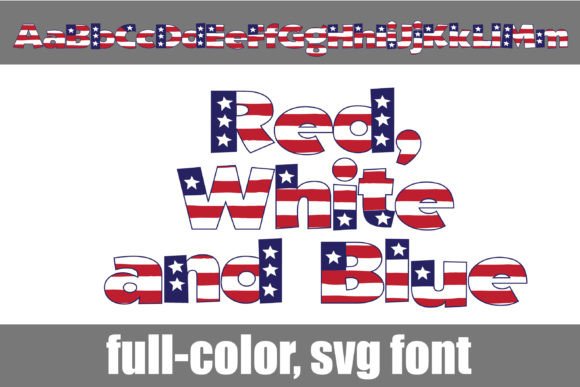
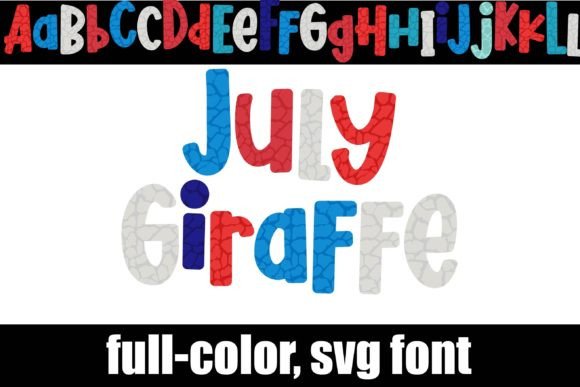
At its core, this is a display typeface, but it’s distinct because it utilizes modern color font technology. Instead of solid black or white strokes, the characters are filled with a wild, giraffe print pattern rendered in a patriotic color palette—think deep navy, crisp whites, and vibrant reds. This creates an immediate visual texture that standard vector fonts simply can't replicate on their own. It’s the kind of typography that stops the scroll, whether you are designing a digital ad or a physical poster.
One of the standout features of this specific creative font is its versatility within that theme. It includes an alternate case with additional colors, accessible through your operating system’s character map or via the glyph map in design software like Silhouette Studio. This means you aren't locked into a single look. You can mix and match the "standard" patriotic prints with the alternate colorways to create depth and hierarchy in your headlines. For designers who love to tinker with modern typography, this opens up a playground of possibilities for creating truly custom headers.
Practical Applications: Where Wild Typography Thrives
Understanding where to use a font like this is just as important as liking the way it looks. Because this is a full-color font with high visual detail, it is strictly a display font. This means it is designed for large sizes—titles, headers, logos, and hero graphics. You wouldn't use this for body copy or long paragraphs, as the intricate pattern would become muddy and unreadable at small sizes. However, for the right project, it is a game-changer.
Here are a few real-world scenarios where July Giraffe shines:
- Seasonal Marketing Assets: If you run an e-commerce store or a blog, the weeks leading up to the Fourth of July are prime time for engagement. Use this typeface for email subject lines, website banners, and social media graphics to instantly signal the theme of your sale or content without needing extra clipart.
- Logo Design & Branding: For businesses with a playful, energetic, or patriotic brand identity, this font can serve as a logotype foundation. Think barbecue restaurants, summer camps, children’s party planners, or boutique clothing lines that specialize in summer wear. It offers a level of brand recognition immediately because the font itself is a visual statement.
- Packaging & Merchandise: If you are a crafter or small business owner selling physical goods, packaging is everything. Imagine this font on hang-tags for a summer collection, or printed on tote bags and mugs. The texture of the giraffe print adds a "premium" feel to the merchandise that standard printing techniques often lack.
- Editorial & Poster Design: Creating a flyer for a block party or a layout for a magazine cover? This font commands attention. It works beautifully when paired with high-contrast backgrounds, such as a solid dark charcoal or a bright white, allowing the patriotic colors to pop.
Technical Compatibility and Installation Tips
When you start working with color fonts (technically known as SVG fonts), the workflow is slightly different than your average OpenType file. It’s crucial to understand how these assets render to avoid frustration during the design process.
First, installation is straightforward. You install the .otf file just like any other font, typically via FontBook on a Mac or the Control Panel on Windows. However, the magic happens in how your software interprets the file. Not every program supports full-color SVG fonts yet. If you try to use this font in a program that doesn't support the technology, it will default to a solid black silhouette. This is actually a nice fallback—it ensures the text is still readable, even if you lose the color—but it’s not the intended look.
Programs that currently support full-color SVG fonts include Adobe Photoshop, Adobe Illustrator, Quark, Inkscape, and, importantly for the crafting community, Silhouette Studio. A common point of confusion occurs in the font preview windows of these programs. Often, the preview list might show the font as black. Don't panic! Once you actually select the font and type your text onto the canvas, the colors should appear. This is a quirk of how software generates previews for complex data files.
Pairing and Professional Presentation
Because July Giraffe is so bold and textured, it requires a careful hand when pairing it with other typefaces. You generally want to avoid pairing it with other decorative or handwritten fonts, as this will create visual chaos. Instead, lean on stability. A clean, geometric sans-serif font works wonders here. The simplicity of the sans-serif allows the wild, patriotic pattern of the display font to be the star of the show.
For example, if you are designing a poster, use the color font for the main event title. Then, use a neutral, professional sans-serif for the date, time, and location details. This contrast improves readability significantly. It guides the viewer's eye, telling them exactly where to look first. Remember, in visual communication, hierarchy is king. You want the font to grab attention, but the supporting text needs to deliver the information clearly.
Licensing and Commercial Use
For small business owners and entrepreneurs, the legal side of design assets is just as important as the aesthetic. Most premium fonts, especially those with complex engineering like full-color SVGs, come with specific licensing terms. Before you launch that new product line or print those 500 flyers, ensure you have reviewed the license included with your download.
Typically, font licenses distinguish between personal use (hobby projects, gifts) and commercial use (items for sale, client work, marketing materials). If you are using this font to generate revenue—whether through a logo for a client or graphics for your own shop—you need to ensure your license covers commercial application. This protects you legally and supports the independent type designers who put hours into coding these unique assets.
Elevating Your Visual Strategy
Ultimately, choosing a typeface like this is about personality. It’s about moving away from safe, generic choices and injecting some life into your projects. Whether you are a content creator looking to spice up your YouTube thumbnails or a graphic designer working on a summer festival campaign, this font offers a specific aesthetic that is hard to fake with filters or overlays.
It bridges the gap between texture and typography. By using the alternate glyphs and understanding the color palette, you can create designs that feel cohesive, festive, and professionally polished. Just remember to keep your audience in mind—ensure the message is clear, the pairing is balanced, and the licensing is sorted. When all those elements align, you have a powerful tool in your design arsenal that is ready to make a statement.